INTRODUCING TECHNOCREW SECURE365

Your business information is valuable. Do you know who's accessing it?

Every day, employees and contractors access, download and share confidential information through Microsoft 365.

TechnoCrew Secure365 combines intelligent activity monitoring, security alerts and expert oversight to help you understand what’s happening inside your business — and identify potential risks before they become bigger problems.
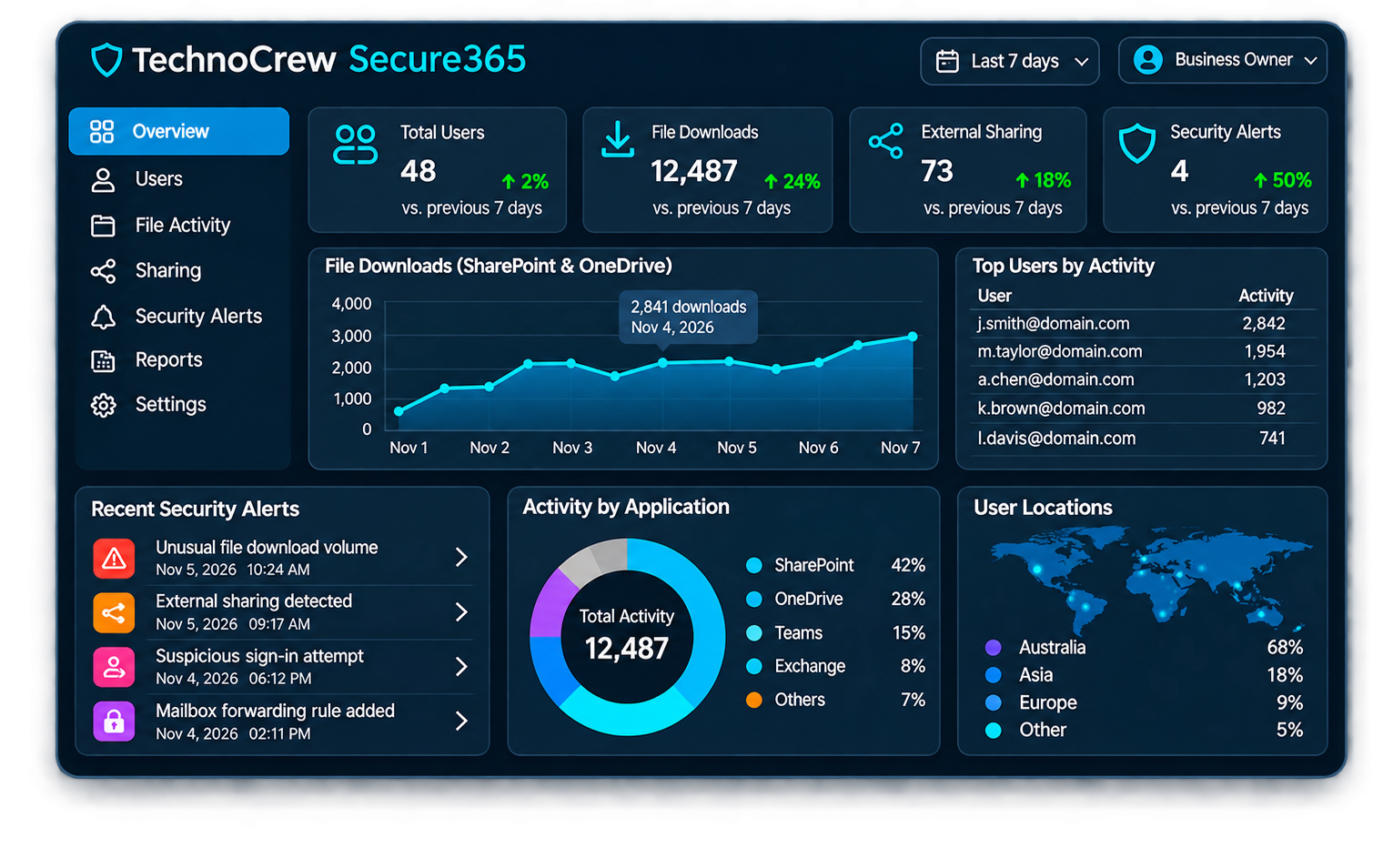
Illustrative dashboard. Actual reporting depends on your Microsoft 365 licensing and Secure365 configuration.

THE RISKS YOU DON'T ALWAYS SEE

Your biggest security risk might already have access.

Firewalls, antivirus and email security are essential. But what happens when someone who already has legitimate access to your Microsoft 365 environment starts using business information in unexpected ways?

Employees and contractors routinely access sensitive client documents, financial records and confidential communications. Without appropriate monitoring, unusual activity can be difficult to identify.

TechnoCrew Secure365 helps bring that activity into view.

Unusual file downloads

An employee or contractor downloads large volumes of confidential client documents in a short period.

External file sharing

Confidential documents are shared with people outside your organisation, potentially exposing sensitive business information.

Contractor activity

Remote employees and external contractors access company information, sometimes beyond what their responsibilities require.

Former employee access

Departing employees or contractors retain access to accounts, documents or shared resources after leaving.

Email forwarding

Unexpected mailbox forwarding rules or changes potentially expose confidential business communications.

Suspicious account activity

Unusual sign-ins, account changes or security events may indicate an account requires investigation.

The challenge isn’t always preventing access. It’s knowing when legitimate access is being used in a potentially dangerous way.

Secure365 helps your business identify activity worth investigating, while TechnoCrew provides the expertise to help you understand what it means.

INTRODUCING SECURE365

One service. Two layers of protection.

Secure365 combines business-friendly security visibility with expert monitoring and support from TechnoCrew. Understand what’s happening in your Microsoft 365 environment while having experienced IT professionals available to help when concerns arise.


Your Secure365 Dashboard

Give authorised business owners and managers visibility into Microsoft 365 activity, document sharing, access permissions and potential security concerns.

Managed by TechnoCrew

Our team helps configure monitoring, establish meaningful alerts and provide practical assistance when potentially concerning activity requires investigation.

COMPREHENSIVE MICROSOFT 365 VISIBILITY

Know what's happening across your Microsoft 365 environment

From confidential file downloads to unexpected account changes, Secure365 helps you understand the activity that matters to your business.

SharePoint & OneDrive Monitoring

Understand how business documents are accessed, downloaded and shared. Identify unusual activity involving confidential files and sensitive client information.

Employee & Contractor Activity

Gain visibility into Microsoft 365 activity across employees, remote workers and external contractors. Understand how accounts are being used and identify activity that may require further investigation.

Email & Collaboration Security

Monitor important Exchange Online and collaboration activity that could expose confidential business information. Identify unexpected configuration changes and review how your organisation communicates and shares information.

Security Alerts & Reporting

Turn Microsoft 365 activity into meaningful security insights. Secure365 combines configurable alerts and management reporting with practical assistance from TechnoCrew when potentially concerning events require attention.


BUILT FOR PROFESSIONAL BUSINESSES

Your clients trust you with their information. We help you protect that trust.

From accounting firms and legal practices to consultants and property businesses, Secure365 helps organisations responsible for confidential information maintain better visibility over how that information is accessed and shared.

Accounting & Financial Services

Your clients trust you with sensitive financial records, taxation information, payroll data and commercially confidential documents. Secure365 helps your practice monitor how Microsoft 365 information is accessed, downloaded and shared.

Legal Practices

Protect the confidentiality of client matters, legal correspondence and sensitive documents. Secure365 helps legal practices maintain visibility into Microsoft 365 access, document downloads and external sharing activity.

Medical & Allied Health Practitioners

Patient confidentiality is essential to every healthcare practice. Secure365 helps medical and allied health providers monitor access to sensitive information stored in Microsoft 365, identify unusual document downloads and external sharing, and maintain visibility across practitioners, administrative staff and contractors.

Property & Real Estate

Help protect contracts, identification documents, financial information and confidential customer records. Secure365 provides additional oversight of how information is accessed, downloaded and shared across your organisation.

REAL-WORLD SECURITY VISIBILITY

What if an employee downloaded 500 client files today?

Without appropriate monitoring, unusual activity involving confidential documents can go unnoticed. Secure365 can help identify unexpected volumes of SharePoint and OneDrive downloads and generate alerts for review. TechnoCrew can then assist your business in understanding whether the activity was legitimate or requires further investigation.

An alert doesn't automatically mean someone has done something wrong. It means your business has information worth reviewing.

Unusual File Download Activity

Account

em******@*****ny.com

Activity

Bulk file download

Files downloaded

487

Time period

45 minutes

Source

SharePoint Online

Activity exceeded the organisation's configured monitoring threshold and may require investigation.

Illustrative example only. Actual alert availability and timing depend on Microsoft 365 audit data, licensing and Secure365 configuration.

SIMPLE TO GET STARTED

Better visibility in three simple steps.

TechnoCrew handles the setup and helps your business turn Microsoft 365 activity into useful security insights.

01

Assess

We review your Microsoft 365 environment, discuss your business risks and identify the monitoring that matters most.

02

Configure

We configure Secure365 reporting, access permissions and relevant security alerts for your organisation.

03

Monitor & Review

Your authorised team gains access to reporting, with TechnoCrew providing agreed notifications, reviews and investigation support.

MORE THAN JUST SOFTWARE

Security technology backed by people who understand your business.

Secure365 combines Microsoft 365 reporting technology with practical guidance from TechnoCrew, helping businesses turn security information into informed decisions. Rather than leaving you to interpret technical reports on your own, we help you understand potential risks and identify practical next steps.

Australian-based support

Work with an Australian IT team that understands local businesses and professional services.

Security expertise

TechnoCrew is ISO/IEC 27001 and ISO 9001 certified, bringing established security and quality management practices to our services.

Practical business guidance

We help translate technical security events into information business owners and managers can understand.

Configured for your organisation

Monitoring priorities, reporting and notifications can be tailored to your business requirements and agreed service scope.

FREQUENTLY ASKED QUESTIONS

Everything you need to know about Secure365.

Understand how Secure365 helps protect your business information and what to expect from the service.

Can Secure365 identify unusual SharePoint downloads?

Yes. Secure365 can help identify unusual SharePoint and OneDrive download activity through supported Microsoft 365 audit data and configured alerts. For example, if an employee downloads an unexpectedly large number of client documents, Secure365 can help bring that activity to the attention of designated personnel for review. Detection depends on available Microsoft 365 audit events, licensing and monitoring configuration.

Can Secure365 monitor employee and contractor activity?

Yes. Secure365 provides visibility into supported Microsoft 365 activity involving employees, remote workers and external contractors. This can include account sign-ins, file downloads, document sharing and changes to access permissions. Secure365 is not a screen recording or keystroke monitoring product. It focuses on activity recorded within your Microsoft 365 environment. For example, if an employee downloads an unexpectedly large number of client documents, Secure365 can help bring that activity to the attention of designated personnel for review. Detection depends on available Microsoft 365 audit events, licensing and monitoring configuration.

Do we need Microsoft 365 Business Premium?

Not necessarily. Secure365 can provide reporting and monitoring for supported Microsoft 365 environments without requiring every user to have Microsoft 365 Business Premium. The information available depends on your existing Microsoft 365 subscriptions, audit logging capabilities and Secure365 configuration. TechnoCrew can assess your environment and advise whether any licensing changes are needed.

Can business owners access the reports?

Secure365 is designed to provide authorised business owners and managers with useful visibility into their Microsoft 365 environment. Depending on the selected service configuration, reporting may be delivered through dashboards, scheduled reports or notifications. TechnoCrew will confirm the available access options during setup.

Does Secure365 prevent employees from downloading files?

Secure365 primarily provides monitoring, reporting and security alerts rather than automatically blocking activity. Where additional protection is required, TechnoCrew can recommend Microsoft 365 security controls and other technologies to help restrict inappropriate access, downloads or external sharing.

What happens when suspicious activity is detected?

When supported activity meets a configured alert condition, Secure365 can notify designated contacts for review. Depending on your service agreement, TechnoCrew can assist with reviewing the activity, determining whether it is legitimate and recommending appropriate next steps. Alert delivery and response times depend on the configured monitoring and agreed support arrangements.

Will monitoring affect employee privacy?

Secure365 focuses on supported activity within your organisation's Microsoft 365 environment, rather than personal device activity or screen recording. We recommend that businesses maintain appropriate employee monitoring policies, inform staff about relevant monitoring practices and ensure that access to activity reports is restricted to authorised personnel. Businesses should obtain independent legal advice about applicable privacy and workplace surveillance requirements.

TAKE THE FIRST STEP

Do you really know what's happening inside your Microsoft 365 environment?

Book a free, no-obligation Secure365 assessment and discover how better monitoring and reporting can help protect your business information.

We’ll discuss your current Microsoft 365 environment, your security concerns and how Secure365 could provide greater visibility over employee activity, document sharing and potential risks.
We recommend that businesses maintain appropriate employee monitoring policies, inform staff about relevant monitoring practices and ensure that access to activity reports is restricted to authorised personnel.

Businesses should obtain independent legal advice about applicable privacy and workplace surveillance requirements.

Request Your Free Assessment